2021年1月25日星期一

甲骨文\腾讯云重装 DD

帖子来源

https://git.beta.gs/


一键DD脚本,支持性好,更智能更全面,支持国内外各种VPS重装,特别是对国内各种访问国外资源慢的VPS安装有奇效。


更新说明:
20210909:支持debian11.
20210511:发现很多人不知道怎么DD甲骨文,使用支持uefi的镜像包即可.脚本已添加3个甲骨文专用选项23-25.
20210509:更新部分windows镜像,修正一处小问题.
20210127:更换部分windows镜像.
20210109:更新支持Ubuntu20.04安装,更新几个windows镜像.
20200708:更新自动为CN主机使用国内镜像源.


安装重装系统的前提组件:
Debian/Ubuntu:

apt-get install -y xz-utils openssl gawk file wget screen && screen -S os

RedHat/CentOS:

yum install -y xz openssl gawk file glibc-common wget screen && screen -S os

如果出现异常,请刷新Mirrors缓存或更换镜像源。
RedHat/CentOS:

yum makecache && yum update -y

Debian/Ubuntu:

apt update -y && apt dist-upgrade -y

使用:

wget --no-check-certificate -O AutoReinstall.sh https://git.io/betags && chmod a+x AutoReinstall.sh && bash AutoReinstall.sh

如为CN主机,可能出现报错或不能下载脚本的问题,可执行以下命令开始安装.

wget --no-check-certificate -O AutoReinstall.sh https://cdn.jsdelivr.net/gh/fcurrk/reinstall@master/AutoReinstall.sh && chmod a+x AutoReinstall.sh && bash AutoReinstall.sh
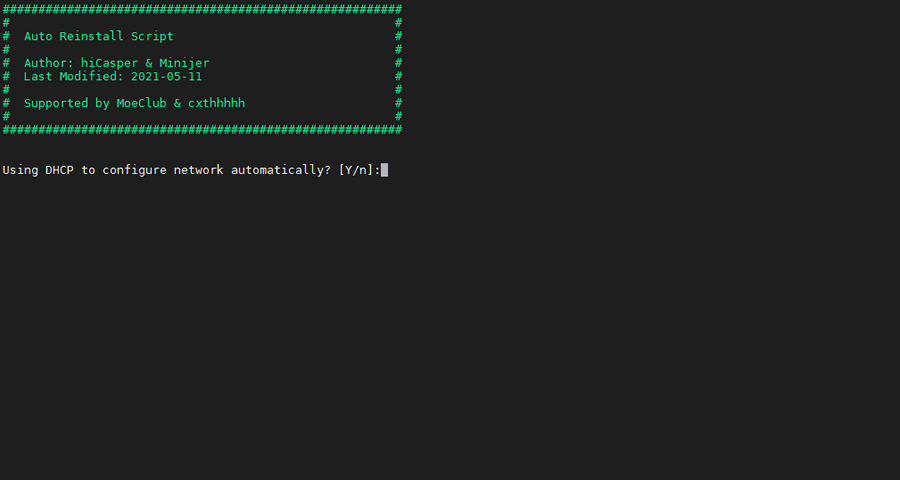

DD安装界面
输入Y确认DD后主机自动获取IP,N则自行设置IP 输入N后会自动检测出主机现用IP,如果正确可以按Y确认使用,如不正确则按N自行按正确的输入。
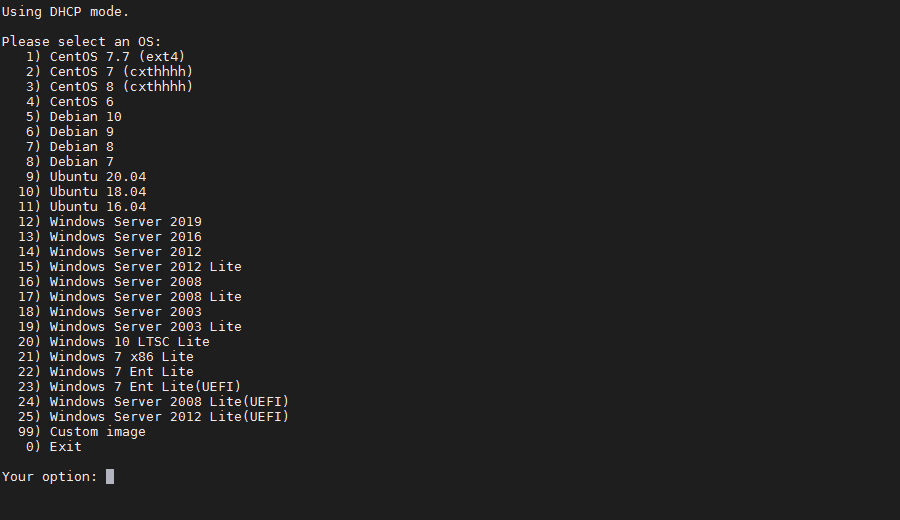
DD安装界面-选择系统
25合1的系统一键DD选择界面,输入99则使用自定义镜像。 以上系统密码不为默认密码的均为网络收集,如有疑虑使用自己的自定义镜像。

25合一系统密码:
1、CentOS 7.7 (已关闭防火墙及SELinux,默认密码Pwd@CentOS)
2、CentOS 7 (默认密码cxthhhhh.com)
3、CentOS 8 (默认密码cxthhhhh.com)
4、CentOS 6 (默认密码Minijer.com)
5、Debian 11 (默认密码Minijer.com)
6、Debian 10 (默认密码Minijer.com)
7、Debian 9 (默认密码Minijer.com)
8、Debian 8 (默认密码Minijer.com)
9、Ubuntu 20.04 (默认密码Minijer.com)
10、Ubuntu 18.04 (默认密码Minijer.com)
11、Ubuntu 16.04 (默认密码Minijer.com)
12、Windows Server 2019 (默认密码cxthhhhh.com)
13、Windows Server 2016 (默认密码cxthhhhh.com)
14、Windows Server 2012 (默认密码cxthhhhh.com)
15、Windows Server 2012 Lite (默认密码nat.ee)
16、Windows Server 2008 (默认密码cxthhhhh.com)
17、Windows Server 2008 Lite (默认密码nat.ee)
18、Windows Server 2003 (默认密码cxthhhhh.com)
19、Windows Server 2003 Lite (默认密码WinSrv2003x86-Chinese)
20、Windows 10 LTSC Lite (默认密码www.nat.ee)
21、Windows 7 x86 Lite (默认密码Windows7x86-Chinese)
22、Windows 7 Ent Lite (默认密码nat.ee)
23、Windows 7 Ent Lite (UEFI支持甲骨文)(默认密码nat.ee)
24、Windows Server 2008 Lite (UEFI支持甲骨文)(默认密码nat.ee)
25、Windows Server 2012 Lite (UEFI支持甲骨文)(默认密码nat.ee)
99、自定义镜像


注意:
经测试在谷歌云原版系统基础上DD会出现自动获取的子网掩码为255.255.255.255,如出现这种情况需要手工输入改正为正确的如255.255.255.0,否则会安装完成主机可能会离线。
Oracle Cloud(甲骨文云)可选择23-25一键DD,注意基础系统最好选择Ubuntu,如原系统是CentOS可能无法成功。

特别感谢:Vicer、cxt、hiCasper等各位技术大佬的脚本,站长只是脚本的"搬运工"。

版权申明:以上所有脚本、系统均为网络收集,站长不对资源的安全及版权纠纷负责,如有侵犯您的权益欢迎联系。
站长邮箱:minijer#beta.gs(#换成@)


下面是旧贴


甲骨文Ubuntu 16 DD成Win 7 来源https://hostloc.com/thread-747479-1-1.html

wget --no-check-certificate -qO InstallNET.sh 'https://tutu.bid/bash/InstallNET.sh' && bash InstallNET.sh -dd 'http://tutu.bid/os/dd/Oracle-Win7-X64%5BAdministrator-www.nat.ee%5D.gz'


--------------------------------------------------------------------------------------------


脚本1

wget --no-check-certificate -O AutoReinstall.sh https://git.io/AutoReinstall.sh && bash AutoReinstall.sh

默认密码为:Pwd@Linux

Pwd@CentOS


-----------------------------------甲骨文ubuntu关防火墙--------------------------------

sudo su

sudo rm -rf /etc/iptables && reboot


#修复xshell5意外丢包错误

nano /etc/ssh/sshd_config

KexAlgorithms curve25519-sha256@libssh.org,ecdh-sha2-nistp256,ecdh-sha2-nistp384,ecdh-sha2-nistp521,diffie-hellman-group14-sha1

---------------------------------------------------------------------------------

来源

https://akun.ltd/860.html


防止yum升级内核

修改yum的配置文件 vim /etc/yum.conf  

在[main]的最后添加

 exclude=kernel*


=============================

脚本2


sudo -i


bash <(wget --no-check-certificate -qO- 'https://moeclub.org/attachment/LinuxShell/InstallNET.sh') -d 10 -v 64 -a


腾讯云步骤:

web登陆ssh输入

sudo passwd root

设置root密码


然后web -实例-重置密码,再设置一次,会有强制重启

之后xshell 用户名ubuntu密码设置的那个登陆腾讯云,输入sudo -i

输入顶部或下面,开始dd

wget --no-check-certificate -qO InstallNET.sh 'https://moeclub.org/attachment/LinuxShell/InstallNET.sh' && chmod a+x InstallNET.sh

bash InstallNET.sh -d 10 -v 64 -a


开机密码  

MoeClub.org


开启BBR

echo net.core.default_qdisc=fq >> /etc/sysctl.conf

echo net.ipv4.tcp_congestion_control=bbr >> /etc/sysctl.conf

sysctl -p


改ssh端口

nano /etc/ssh/sshd_config

Debian9安装openssl 1.1.1i

 原文

依赖sudo apt-get install libnet-rawip-perl libssl-dev


  1. wget https://www.openssl.org/source/openssl-1.1.1g.tar.gz
  2. tar -zxf openssl-1.1.1g.tar.gz && cd openssl-1.1.1g
  3. sudo apt install make gcc
  4. ./config
  5. make
  6. sudo make install

  7. sudo ln -s /usr/local/bin/openssl /usr/bin/openssl
    
  8. sudo ldconfig 
openssl version

Your output should be as follows:

OpenSSL 1.1.1g  21 Apr 2020

2021年1月15日星期五

制作黑群晖U盘

1:使用balenaEtcher等U盘工具把synoboot.img写入U盘


2:使用DiskGenius把U盘grub.cfg复制到桌面,notepad++打开

3:使用chipgenius获得VID PID信息

      修改grub.cfg VID PID为U盘的信息保存

4:把修改后的grub.cfg覆盖回U盘同文件

5:U盘插入黑群晖,电脑访问群晖IP地址启动安装


2020年12月25日星期五

Debian 9安装Haproxy 2.2.x新版


Instructions for latest release

You need to enable a dedicated repository:

# curl https://haproxy.debian.net/bernat.debian.org.gpg | \
      apt-key add -
# echo deb http://haproxy.debian.net stretch-backports-2.2 main | \
      tee /etc/apt/sources.list.d/haproxy.list

Then, use the following commands:

# apt-get update
# apt-get install haproxy=2.2.\*

You will get the latest release of HAProxy 2.2 (and stick to this branch).


来源

https://haproxy.debian.net/

HAProxy 让 Trojan-gfw 和 V2Ray 共存

参考来源 

https://lhy.life/20200909-haproxy/


HAProxy 配置

global

        log /dev/log local0

        log /dev/log local1 notice

        chroot /var/lib/haproxy

        user haproxy

        group haproxy

        daemon


defaults

        log global

        mode tcp

        option tcplog

        option dontlognull

        timeout connect 24h

        timeout client 24h

        timeout server 24h


frontend ssl

        mode tcp

        bind *:443


        tcp-request inspect-delay 3s

        tcp-request content accept if { req.ssl_hello_type 1 }


        use_backend trojan if { req_ssl_sni -i trojan.exp.com }

        use_backend naiveproxy if { req_ssl_sni -i naive.exp.com }       

        use_backend v2ray if { req_ssl_sni -i v2ray.exp.com }

        use_backend web1 if { req_ssl_sni -i web1.exp.com }

        use_backend web2 if { req_ssl_sni -i web2.exp.com }


backend trojan

        mode tcp

        server trojan 127.0.0.1:350


backend naiveproxy

        mode tcp

        server naiveproxy 127.0.0.1:352


backend v2ray

        mode tcp

        server v2ray 127.0.0.1:353


backend web1

        mode tcp

        server web1 127.0.0.1:356


backend web2

        mode tcp

        server web2 127.0.0.1:357


Trojan 服务端配置

{

    "run_type": "server",

    "local_addr": "0.0.0.0",

    "local_port": 350,

    "remote_addr": "127.0.0.1",

    "remote_port": 351,

    "password": [

        "passwd1",

        "passwd2"

    ],

    "log_level": 1,

    "ssl": {

        "cert": "/path/cert.pem",

        "key": "/path/key.pem",

        "key_password": "",

        "cipher_tls13": "TLS_AES_128_GCM_SHA256:TLS_CHACHA20_POLY1305_SHA256:TLS_AES_256_GCM_SHA384",

        "prefer_server_cipher": true,

        "alpn": [

            "http/1.1"

        ],

        "alpn_port_override": {

            "h2": 81

        },

        "reuse_session": true,

        "session_ticket": false,

        "session_timeout": 600,

        "plain_http_response": "",

        "curves": "",

        "dhparam": ""

    },

    "tcp": {

        "prefer_ipv4": false,

        "no_delay": true,

        "keep_alive": true,

        "reuse_port": false,

        "fast_open": false,

        "fast_open_qlen": 20

    },

    "mysql": {

        "enabled": false,

        "server_addr": "127.0.0.1",

        "server_port": 3306,

        "database": "trojan",

        "username": "trojan",

        "password": "",

        "cafile": ""

    }

}


NaiveProxy 服务端 Caddy 配置

{

    "admin": {

          "disabled": true

    },

    "apps": {

       "http": {

         "servers": {

           "web1": {

             "listen": [":352"],

             "routes": [{

               "handle": [{

                 "handler": "forward_proxy",

                 "hide_ip": true,

                 "hide_via": true,

                 "auth_user": "你的账户",

                 "auth_pass": "你的密码",

                 "probe_resistance": {"domain": "your-secret-link.localhost"}

               }]

             }, {

               "match": [{"host": ["naive.exp.com"]}],

               "handle": [{

                 "handler": "file_server",

                 "root": "/path/naive.exp.com",

                 "index_names": ["index.html"]

               }],

               "terminal": true

             }],

             "tls_connection_policies": [{

               "match": {"sni": ["naive.exp.com"]}

             }],

             "automatic_https": {

               "disable": true

             }

           }

         }

       },

       "tls": {

         "certificates": {

           "load_files": [{

             "certificate": "/path/cert.pem",

             "key": "/path/key.pem"

           }]

         }

       }

    }

}


V2Ray 服务端配置

VLESS+TCP+TLS 和 VMess+WebSocket+TLS 配置


{

    "log": {

        "loglevel": "warning"

    },

    "inbounds": [

        {

            "port": 353,

            "protocol": "vless",

            "settings": {

                "clients": [

                    {

                        "id": "你的UUID",

                        "level": 0

                    }

                ],

                "decryption": "none",

                "fallbacks": [

                    {

                        "dest": 354

                    },

                    {

                        "path": "/yourpath",

                        "dest": 355

                    }

                ]

            },

            "streamSettings": {

                "network": "tcp",

                "security": "tls",

                "tlsSettings": {

                    "alpn": [

                        "http/1.1"

                    ],

                    "certificates": [

                        {

                            "certificateFile": "/path/to/fullchain.crt",

                            "keyFile": "/path/to/private.key"

                        }

                    ]

                }

            }

        },

        {

            "port": 355, 

            "listen": "127.0.0.1", 

            "protocol": "vmess", 

            "settings": {

                "clients": [

                    {

                        "id": "你的UUID", 

                        "level": 0,

                        "alterId": 4

                    }

                ]

            }, 

            "streamSettings": {

                "network": "ws", 

                "wsSettings": {

                    "path": "/yourpath 和上面一样"

                }

            }

        }

    ], 

    "outbounds": [

        {

            "protocol": "freedom"

        }

    ]

}


Nginx 配置

user root root

...

events {

    ...

}

http {

    ...


    ## Trojan 伪装站点配置

    server {

        listen 80;

        listen [::]:80;

        server_name trojan.exp.com;

        return 301 https://trojan.exp.com$request_uri;

    }

    server {

        listen 351;

        server_name trojan.exp.com;

        index index.php index.html;

        root /www/wwwroot/trojan.exp.com;

        ...

    }


    ## NaiveProxy 配置(只处理http重定向至https)

    server {

        listen 80;

        listen [::]:80;

        server_name naive.exp.com;

        return 301 https://naive.exp.com$request_uri;

    }


    ## VLESS 回落站点配置

    server {

        listen 80;

        listen [::]:80;

        server_name v2ray.exp.com;

        return 301 https://v2ray.exp.com$request_uri;

    }

    server {

        listen 354;

        server_name v2ray.exp.com;

        index index.php index.html;

        root /www/wwwroot/v2ray.exp.com;

        ...

    }


    ## web1 站点配置

    server {

        listen 80;

        listen [::]:80;

        server_name web1.exp.com;

        return 301 https://web1.exp.com$request_uri;

    }

    server {

        listen 356 ssl http2;

        server_name web1.exp.com;

        index index.php index.html;

        root /www/wwwroot/web1.exp.com;


        ssl_certificate /path/to/fullchain.crt;

        ssl_certificate_key /path/to/private.key;

        ...

    }


    ## web2 站点配置

    server {

        listen 80;

        listen [::]:80;

        server_name web2.exp.com;

        return 301 https://web2.exp.com$request_uri;

    }

    server {

        listen 357 ssl http2;

        server_name web2.exp.com;

        index index.php index.html;

        root /www/wwwroot/web2.exp.com;


        ssl_certificate /path/to/fullchain.crt;

        ssl_certificate_key /path/to/private.key;

        ...

    }

    ...

}


为 Nginx 启用 PROXY protocol

HAProxy 配置

...

backend web1

        mode tcp

        server web1 127.0.0.1:356 send-proxy


backend web2

        mode tcp

        server web2 127.0.0.1:357 send-proxy

...

Nginx 配置

...

http {

    ...

    ## web1 站点配置

    ...

    server {

        listen 356 ssl http2 proxy_protocol;

        server_name web1.exp.com;

        index index.php index.html;

        root /www/wwwroot/web1.exp.com;


        set_real_ip_from 127.0.0.1;

        real_ip_header proxy_protocol;


        ssl_certificate /path/to/fullchain.crt;

        ssl_certificate_key /path/to/private.key;

        ...

    }


    ## web2 站点配置

    ...

    server {

        listen 357 ssl http2 proxy_protocol;

        server_name web2.exp.com;

        index index.php index.html;

        root /www/wwwroot/web2.exp.com;


        set_real_ip_from 127.0.0.1;

        real_ip_header proxy_protocol;


        ssl_certificate /path/to/fullchain.crt;

        ssl_certificate_key /path/to/private.key;

        ...

    }

    ...

}


2020年12月22日星期二

Centos 7 安装emby后无法启用的问题排除

输入service emby-server status

如果看到 

emby-server[1622]: at System.IO.Directory.CreateDirectory(String path)

说明无写入权限

解决方式:

chmod 777/var/lib/emby

chmod 777/var/lib


2020年12月10日星期四

V2Ray 客户端跑Https模式(Http+tls)

一个客户端json范本,供参考


 {

    "log": {

        "access": "",

        "error": "",

        "loglevel": "warning"

    },

    "inbounds": [

        {

            "tag": "proxy",

            "port": 10809,

            "listen": "0.0.0.0",

            "protocol": "socks",

            "sniffing": {

                "enabled": true,

                "destOverride": [

                    "http",

                    "tls"

                ]

            },

            "settings": {

                "auth": "noauth",

                "udp": true

            }

        }

    ],

    "outbounds": [

        {

            "protocol": "http",

            "settings": {

                "servers": [

                    {

                        "address": "www.mydomain.com",

                        "port": 21345,

                        "users": [

                            {

                                "user": "user",

                                "pass": "passwd"

                            }

                        ]

                    }

                ]

            },

            "streamSettings": {"security": "tls"}

        }

    ],

    "routing": {

        "domainStrategy": "IPIfNonMatch",

        "rules": [

            {

                "type": "field",

                "inboundTag": [

                    "api"

                ],

                "outboundTag": "api"

            },

            {

                "type": "field",

                "outboundTag": "proxy",

                "domain": [

                    "geosite:google",

                    "geosite:github",

                    "geosite:netflix",

                    "geosite:steam",

                    "geosite:telegram",

                    "geosite:tumblr",

                    "geosite:speedtest",

                    "geosite:bbc",

                    "domain:gvt1.com",

                    "domain:textnow.com",

                    "domain:twitch.tv",

                    "domain:wikileaks.org",

                    "domain:naver.com"

                ]

            },

            {

                "type": "field",

                "outboundTag": "proxy",

                "ip": [

                    "91.108.4.0/22",

                    "91.108.8.0/22",

                    "91.108.12.0/22",

                    "91.108.20.0/22",

                    "91.108.36.0/23",

                    "91.108.38.0/23",

                    "91.108.56.0/22",

                    "149.154.160.0/20",

                    "149.154.164.0/22",

                    "149.154.172.0/22",

                    "74.125.0.0/16",

                    "173.194.0.0/16",

                    "172.217.0.0/16",

                    "216.58.200.0/24",

                    "216.58.220.0/24",

                    "91.108.56.116",

                    "91.108.56.0/24",

                    "109.239.140.0/24",

                    "149.154.167.0/24",

                    "149.154.175.0/24"

                ]

            },

            {

                "type": "field",

                "outboundTag": "direct",

                "domain": [

                    "domain:12306.com",

                    "domain:51ym.me",

                    "domain:52pojie.cn",

                    "domain:8686c.com",

                    "domain:abercrombie.com",

                    "domain:adobesc.com",

                    "domain:air-matters.com",

                    "domain:air-matters.io",

                    "domain:airtable.com",

                    "domain:akadns.net",

                    "domain:apache.org",

                    "domain:api.crisp.chat",

                    "domain:api.termius.com",

                    "domain:appshike.com",

                    "domain:appstore.com",

                    "domain:aweme.snssdk.com",

                    "domain:bababian.com",

                    "domain:battle.net",

                    "domain:beatsbydre.com",

                    "domain:bet365.com",

                    "domain:bilibili.cn",

                    "domain:ccgslb.com",

                    "domain:ccgslb.net",

                    "domain:chunbo.com",

                    "domain:chunboimg.com",

                    "domain:clashroyaleapp.com",

                    "domain:cloudsigma.com",

                    "domain:cloudxns.net",

                    "domain:cmfu.com",

                    "domain:culturedcode.com",

                    "domain:dct-cloud.com",

                    "domain:didialift.com",

                    "domain:douyutv.com",

                    "domain:duokan.com",

                    "domain:dytt8.net",

                    "domain:easou.com",

                    "domain:ecitic.net",

                    "domain:eclipse.org",

                    "domain:eudic.net",

                    "domain:ewqcxz.com",

                    "domain:fir.im",

                    "domain:frdic.com",

                    "domain:fresh-ideas.cc",

                    "domain:godic.net",

                    "domain:goodread.com",

                    "domain:haibian.com",

                    "domain:hdslb.net",

                    "domain:hollisterco.com",

                    "domain:hongxiu.com",

                    "domain:hxcdn.net",

                    "domain:images.unsplash.com",

                    "domain:img4me.com",

                    "domain:ipify.org",

                    "domain:ixdzs.com",

                    "domain:jd.hk",

                    "domain:jianshuapi.com",

                    "domain:jomodns.com",

                    "domain:jsboxbbs.com",

                    "domain:knewone.com",

                    "domain:kuaidi100.com",

                    "domain:lemicp.com",

                    "domain:letvcloud.com",

                    "domain:lizhi.io",

                    "domain:localizecdn.com",

                    "domain:lucifr.com",

                    "domain:luoo.net",

                    "domain:mai.tn",

                    "domain:maven.org",

                    "domain:miwifi.com",

                    "domain:moji.com",

                    "domain:moke.com",

                    "domain:mtalk.google.com",

                    "domain:mxhichina.com",

                    "domain:myqcloud.com",

                    "domain:myunlu.com",

                    "domain:netease.com",

                    "domain:nfoservers.com",

                    "domain:nssurge.com",

                    "domain:nuomi.com",

                    "domain:ourdvs.com",

                    "domain:overcast.fm",

                    "domain:paypal.com",

                    "domain:paypalobjects.com",

                    "domain:pgyer.com",

                    "domain:qdaily.com",

                    "domain:qdmm.com",

                    "domain:qin.io",

                    "domain:qingmang.me",

                    "domain:qingmang.mobi",

                    "domain:qqurl.com",

                    "domain:rarbg.to",

                    "domain:rrmj.tv",

                    "domain:ruguoapp.com",

                    "domain:sm.ms",

                    "domain:snwx.com",

                    "domain:soku.com",

                    "domain:startssl.com",

                    "domain:store.steampowered.com",

                    "domain:symcd.com",

                    "domain:teamviewer.com",

                    "domain:tmzvps.com",

                    "domain:trello.com",

                    "domain:trellocdn.com",

                    "domain:ttmeiju.com",

                    "domain:udache.com",

                    "domain:uxengine.net",

                    "domain:weather.bjango.com",

                    "domain:weather.com",

                    "domain:webqxs.com",

                    "domain:weico.cc",

                    "domain:wenku8.net",

                    "domain:werewolf.53site.com",

                    "domain:windowsupdate.com",

                    "domain:wkcdn.com",

                    "domain:workflowy.com",

                    "domain:xdrig.com",

                    "domain:xiaojukeji.com",

                    "domain:xiaomi.net",

                    "domain:xiaomicp.com",

                    "domain:ximalaya.com",

                    "domain:xitek.com",

                    "domain:xmcdn.com",

                    "domain:xslb.net",

                    "domain:xteko.com",

                    "domain:yach.me",

                    "domain:yixia.com",

                    "domain:yunjiasu-cdn.net",

                    "domain:zealer.com",

                    "domain:zgslb.net",

                    "domain:zimuzu.tv",

                    "domain:zmz002.com",

                    "domain:samsungdm.com"

                ]

            },

            {

                "type": "field",

                "outboundTag": "block",

                "domain": [

                    "geosite:category-ads"

                ]

            },

            {

                "type": "field",

                "outboundTag": "direct",

                "ip": [

                    "geoip:private"

                ]

            },

            {

                "type": "field",

                "outboundTag": "direct",

                "ip": [

                    "geoip:cn"

                ]

            },

            {

                "type": "field",

                "outboundTag": "direct",

                "domain": [

                    "geosite:cn"

                ]

            }

        ]

    }

}

在VPS上,把onedrive/google team drive 网盘 映射出webdav:8080 ( rclone )

1:pc rclone 挂载上网盘后,复制配置文件到vps上 vps输入下面临时建立webdav rclone serve webdav od: \   --addr 0.0.0.0:8080 \   --user admin --pass 'admin' \  ...